
Medical Practitioner: Laboratory Results
Ampath Pro Plus App
Access your patient's results by downloading the Ampath Pro Plus App from the App or Play store.
Email Results
Access your patient's results via email, by clicking on the link below to register. Note that emailed reports are not encrypted, hence we legally require that you read through and agree to the Terms and Conditions for obtaining unencrypted emailed reports.
Access your patient's results by sending a message to 0761 AMPATH (0761 267284) and following the prompts.
Electronic Results Support
.svg)

Frequently Asked Questions
Meaning: Incorrect username
Resolution: Use registered mnemonic e.g. abdde01. Ensure there are no typos or extra spaces.
Meaning: Incorrect password
Resolution: Double-check for typos or case sensitivity. Reset the password if necessary.
Step-by-Step Resolution:
➤ Clear Browser Cache
➤ Press Ctrl + F5 to refresh the browser and clear cached data.Retry Sign-In
➤ Attempt to sign in again after refreshing.If the Issue Persists and the user is on the hospital’s network:
✅ Is Ampath whitelisted on the hospital network?
🔄 Is a different network available?Still Not Working?
➤ Take screenshots and forward them to Ampath Marketing for further investigation.
Step-by-Step Resolution:
1. Check Display Settings: Confirm if the Cumulative setting is selected.
2. Understand Cumulative Limitations: The Cumulative view will not show microbiology results that have: No organism found/No growth /No culture
3. Toggle View Settings: Switch between: Cumulative setting/Specimen List setting on Ampath Pro (APR).
Step-by-Step Resolution:
1. Check Display Settings: Confirm if the Cumulative setting is selected.
2. Understand Cumulative Limitations: Cumulative view will not display histology or cytology results because these reports do not print on a cumulative grid.
3. Toggle View Settings: Switch between Cumulative setting/Specimen List setting on Ampath Pro (APR).
Step-by-Step Resolution:
1. Switch Network: Try switching to mobile data instead of Wi-Fi.
2. Retry Access: Attempt to sign in again after switching networks.
3. Still Not Working? Contact your local Ampath Marketing team for further assistance.
Providers can only add one additional email address for results to be sent to. If this email address needs to be updated, please contact your local Ampath Marketing team.
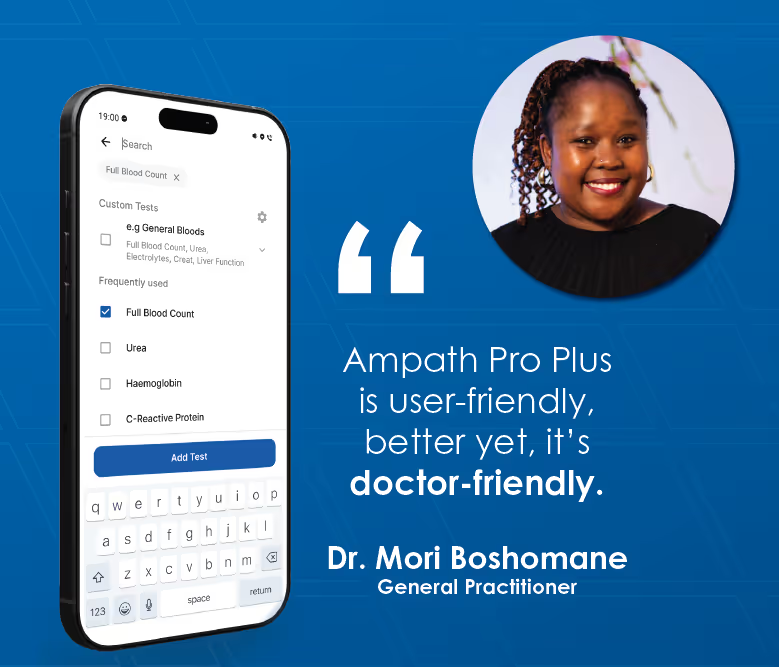
Why Ampath Pro Plus?
We have reimagined the original Ampath Pro app to reduce admin, enhance clinical decision-making, and improve patient outcomes.
Designed in collaboration with doctors, every step of the pathology process is simplified—from ordering tests, to reviewing results.


Key Features
Orders, Simplified: Create quick, paperless pathology orders sent directly to your patient.
New Results, Simplified: Instantly access and review pathology results as they become available.
Previous Results, Simplified: Get quick access to a patient's historical results.
Add-On Tests, Simplified: Add tests directly from the app – no phone calls needed.
Follow In-Hospital Patients: Receive real-time results of admitted patients, even if you are not the requesting doctor.
Flag Patients for Follow-up: Easily mark results to review or act on later.
Intuitive, Doctor-Driven Design: A redesigned interface for faster, easier navigation and use.

Learn More About Ampath Pro Plus

The app is available to all HPCSA-registered Medical Practitioners. Doctors can now download and use Ampath Pro Plus to order pathology tests, request add-ons, and access results.
Users can log in using their existing Ampath Pro login credentials.
Users will be able to keep both apps on their phones to allow them to get comfortable with the new app. Ampath Pro Plus is not an update of the current app, but rather a completely new app. Ampath Pro will gradually be phased out, over a period of six months or longer.
It allows doctors to electronically order out-patient tests using only basic patient information: name, cell phone number and the requested tests. The patient will receive a notification email and sms from the laboratory to complete their details and come to a Care Centre to have their specimens taken.
Doctors can use the app to add-on tests. Feedback with regards to if the add on test could be performed or not will be done via the app.
Phone calls are no longer required to request add-on testing. The add-on test request and feedback will take place on the Ampath Pro Plus app.
The doctor can contact their local area marketer, or Ampath's Client Services to assist with any techinical difficulties or to provide additional information.